
Version Info: This article is written for developers building modern ASP.NET Core applications and integrating Claude through Anthropic’s official C# SDK. I am focusing on practical architecture, prompt handling, and error handling rather than just a quick demo.
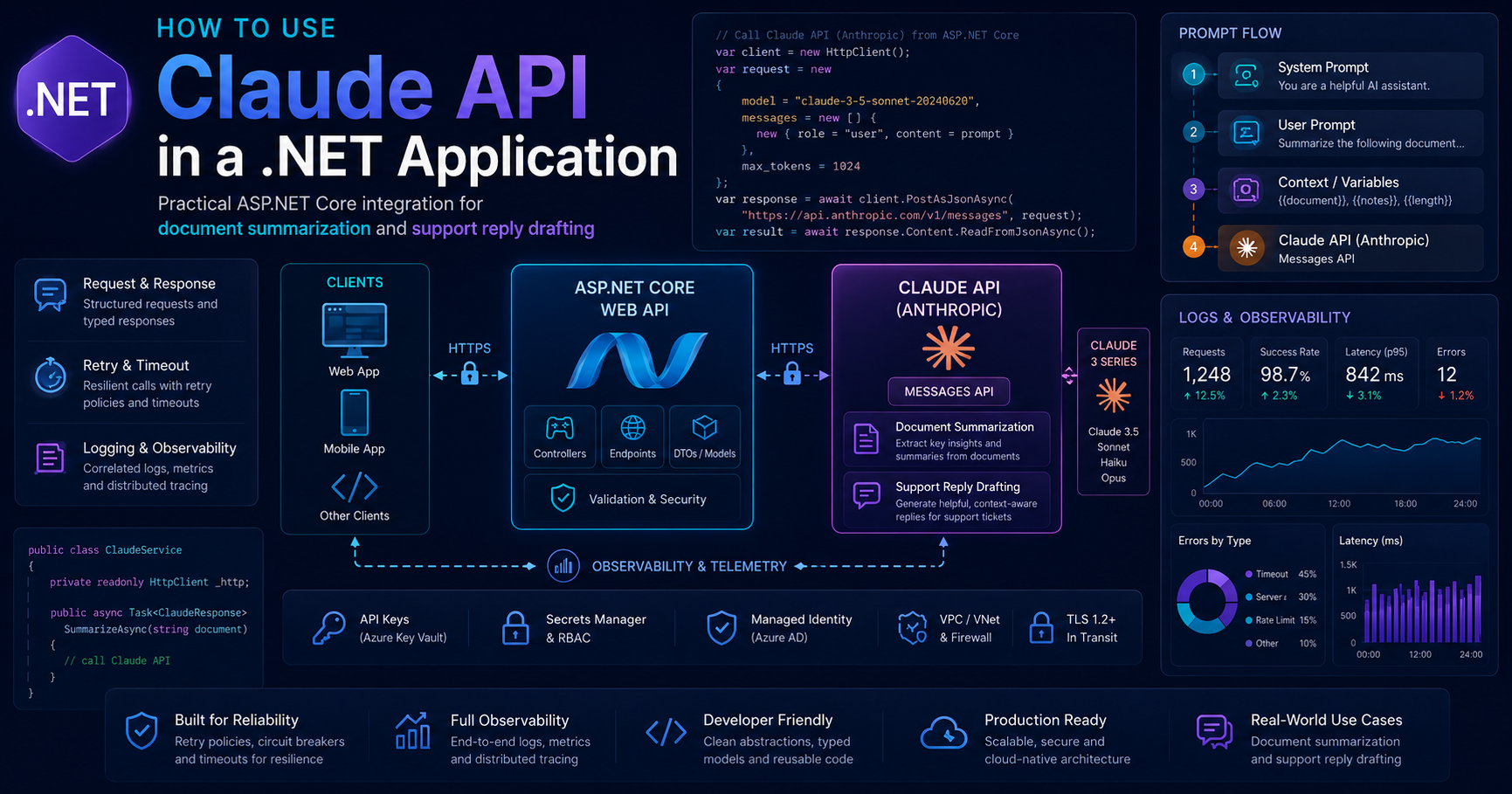
How to Use Claude API in a .NET Application for ASP.NET Core Teams
When .NET teams first add AI to an application, they usually do not need a giant platform. They need one clean service, one reliable integration path, and one business use case that actually helps users. That is exactly how I would approach Claude in a .NET application.
In this guide, I will show how I would integrate Claude into an ASP.NET Core service for two common scenarios: document summarization and support reply drafting. More importantly, I will show how I would structure the integration so it is maintainable, testable, and ready for real production traffic.
Who Should Read This
- .NET developers adding AI features to ASP.NET Core applications
- Architects designing a clean service layer for LLM integration
- Teams evaluating Claude for internal productivity or support workflows
- Developers who want practical prompt handling and error handling guidance
Key Takeaways
- Keep Claude integration behind a dedicated application service instead of calling it directly from controllers.
- Structure prompts carefully so your instructions, context, and user input stay separated.
- Handle retries, timeouts, rate limits, and response truncation intentionally.
- Log request identifiers and track usage so production troubleshooting is easier.
- Start with one strong use case such as summarization or reply drafting before expanding into broader AI workflows.
Table of Contents
- Why use Claude in a .NET application
- Recommended architecture
- Project setup
- Building the Claude service
- Prompt handling best practices
- Error handling and resilience
- Production considerations
- Suggested outbound links
- FAQ
- Final thoughts
Why use Claude in a .NET application
In many enterprise applications, AI is most useful when it fits naturally into an existing workflow. I am not talking about adding a chatbot just because it is trendy. I am talking about concrete tasks such as summarizing uploaded documents, drafting support replies, creating case notes, or helping internal teams process large volumes of text faster.
That is where Claude can be useful in a .NET application. Instead of changing your whole platform, you can add a focused AI capability behind an ASP.NET Core API and keep the rest of your architecture familiar.
For example, a support workflow might look like this:
- A customer message arrives through a portal or support inbox
- Your ASP.NET Core service gathers the relevant context
- A Claude service drafts a reply based on policy and tone instructions
- Your application returns the draft to an agent for review
A document workflow is similar:
- A user uploads a long report or case summary
- Your API extracts the text
- Claude returns a concise summary, action items, and risks
- Your application stores or displays the result
This approach works especially well when you want AI to assist people instead of replacing business logic.
The architecture I recommend
For a production-friendly first version, I prefer a simple layered design:
Controller → Application Service → Claude Client Wrapper → Anthropic API
This separation matters. It keeps HTTP concerns, prompt construction, and model-calling logic from getting mixed together. It also makes testing much easier.
Why I do not call the model directly from the controller
It is tempting to place everything into one controller action when building a quick demo. But once you need retries, logging, token limits, structured outputs, and business-specific prompt templates, that shortcut becomes technical debt.
A dedicated service lets you:
- Reuse prompt builders across multiple endpoints
- Mock the AI integration in tests
- Centralize error handling and logging
- Swap model configuration without rewriting controllers
Project setup
I usually start with a clean ASP.NET Core Web API project and then add a dedicated service for AI integration.
Install the SDK
dotnet add package AnthropicConfiguration model
public sealed class ClaudeOptions
{
    public string ApiKey { get; set; } = string.Empty;
    public string Model { get; set; } = "claude-sonnet";
    public int MaxTokens { get; set; } = 1200;
}
appsettings.json
{
  "Claude": {
    "ApiKey": "",
    "Model": "claude-sonnet",
    "MaxTokens": 1200
  }
}
In a real environment, I would avoid hardcoding secrets in configuration files committed to source control. Use environment variables, secret stores, or platform-specific secure configuration instead.
Dependency injection setup
using Anthropic;
using Microsoft.Extensions.Options;

var builder = WebApplication.CreateBuilder(args);

builder.Services.Configure<ClaudeOptions>(
    builder.Configuration.GetSection("Claude"));

builder.Services.AddSingleton(sp =>
{
    var options = sp.GetRequiredService<IOptions<ClaudeOptions>>().Value;

    return new AnthropicClient
    {
        ApiKey = options.ApiKey,
        MaxRetries = 3,
        Timeout = TimeSpan.FromSeconds(90),
        ResponseValidation = true
    };
});

builder.Services.AddScoped<IClaudeService, ClaudeService>();
builder.Services.AddControllers();

var app = builder.Build();
app.MapControllers();
app.Run();
I like this because it keeps the client centralized and makes runtime behavior easier to adjust. You can tune retries, timeouts, and model settings without spreading those decisions everywhere in the codebase.
Building the Claude service
Next, I create request models that reflect the business use case instead of exposing raw model parameters directly to the controller.
Request DTOs
public sealed class SummarizeRequest
{
    public string DocumentText { get; set; } = string.Empty;
    public string Audience { get; set; } = "business";
}

public sealed class SupportReplyRequest
{
    public string CustomerMessage { get; set; } = string.Empty;
    public string ProductName { get; set; } = string.Empty;
    public string SupportPolicy { get; set; } = string.Empty;
}

public sealed class AiTextResponse
{
    public string Text { get; set; } = string.Empty;
}
Service interface
public interface IClaudeService
{
    Task<string> SummarizeDocumentAsync(SummarizeRequest request);
    Task<string> DraftSupportReplyAsync(SupportReplyRequest request);
}
Service implementation
using System.Text;
using System.Text.Json;
using Anthropic;
using Anthropic.Models.Messages;
using Microsoft.Extensions.Options;

public sealed class ClaudeService : IClaudeService
{
    private readonly AnthropicClient _client;
    private readonly ClaudeOptions _options;
    private readonly ILogger<ClaudeService> _logger;

    public ClaudeService(
        AnthropicClient client,
        IOptions<ClaudeOptions> options,
        ILogger<ClaudeService> logger)
    {
        _client = client;
        _options = options.Value;
        _logger = logger;
    }

    public async Task<string> SummarizeDocumentAsync(SummarizeRequest request)
    {
        var prompt = BuildSummaryPrompt(request);
        return await SendPromptAsync(prompt);
    }

    public async Task<string> DraftSupportReplyAsync(SupportReplyRequest request)
    {
        var prompt = BuildSupportReplyPrompt(request);
        return await SendPromptAsync(prompt);
    }

    private async Task<string> SendPromptAsync(string prompt)
    {
        var parameters = new MessageCreateParams
        {
            Model = _options.Model,
            MaxTokens = _options.MaxTokens,
            Messages =
            [
                new()
                {
                    Role = Role.User,
                    Content = prompt
                }
            ]
        };

        try
        {
            var response = await _client.WithRawResponse.Messages.Create(parameters);

            var requestId = response.Headers.TryGetValues("request-id", out var values)
                ? values.FirstOrDefault()
                : null;

            if (!string.IsNullOrWhiteSpace(requestId))
            {
                _logger.LogInformation("Claude request-id: {RequestId}", requestId);
            }

            var json = await response.RawMessage.Content.ReadAsStringAsync();
            var text = ExtractTextFromMessageJson(json);

            return string.IsNullOrWhiteSpace(text)
                ? "No text response was returned."
                : text;
        }
        catch (AnthropicRateLimitException ex)
        {
            _logger.LogWarning(ex, "Rate limit encountered while calling Claude.");
            throw new ApplicationException("Claude rate limit hit. Please retry shortly.");
        }
        catch (AnthropicUnauthorizedException ex)
        {
            _logger.LogError(ex, "Claude authentication failed.");
            throw new ApplicationException("Claude API authentication failed.");
        }
        catch (AnthropicBadRequestException ex)
        {
            _logger.LogError(ex, "Claude request was invalid.");
            throw new ApplicationException("Invalid Claude request.");
        }
        catch (Anthropic5xxException ex)
        {
            _logger.LogError(ex, "Claude service-side failure.");
            throw new ApplicationException("Claude service is temporarily unavailable.");
        }
        catch (AnthropicIOException ex)
        {
            _logger.LogError(ex, "Network issue while calling Claude.");
            throw new ApplicationException("Network error while calling Claude.");
        }
    }

    private static string BuildSummaryPrompt(SummarizeRequest request)
    {
        return $"""
<instructions>
You are an enterprise assistant helping summarize business documents.
Write a concise and accurate summary.
Do not invent facts.
Return:
1. Executive summary
2. Key points
3. Risks or open questions
4. Recommended next steps
Adjust the tone for this audience: {request.Audience}
</instructions>

<input_document>
{request.DocumentText}
</input_document>
""";
    }

    private static string BuildSupportReplyPrompt(SupportReplyRequest request)
    {
        return $"""
<instructions>
You are a customer support assistant.
Draft a professional, warm, and concise reply.
Acknowledge the customer's issue.
Do not promise actions that are not supported by policy.
If the policy does not allow a refund, explain that politely and offer the next best step.
Return only the email body.
</instructions>

<product>{request.ProductName}</product>

<support_policy>
{request.SupportPolicy}
</support_policy>

<customer_message>
{request.CustomerMessage}
</customer_message>
""";
    }

    private static string ExtractTextFromMessageJson(string json)
    {
        using var doc = JsonDocument.Parse(json);

        if (!doc.RootElement.TryGetProperty("content", out var content) ||
            content.ValueKind != JsonValueKind.Array)
        {
            return string.Empty;
        }

        var sb = new StringBuilder();

        foreach (var block in content.EnumerateArray())
        {
            if (block.TryGetProperty("type", out var typeProp) &&
                typeProp.GetString() == "text" &&
                block.TryGetProperty("text", out var textProp))
            {
                var value = textProp.GetString();
                if (!string.IsNullOrWhiteSpace(value))
                {
                    if (sb.Length > 0)
                        sb.AppendLine().AppendLine();

                    sb.Append(value);
                }
            }
        }

        return sb.ToString().Trim();
    }
}
This is a good first version because it separates prompt creation from HTTP endpoints and gives you one place to improve logging, retries, and output handling later.
Controller example
using Microsoft.AspNetCore.Mvc;

[ApiController]
[Route("api/ai")]
public sealed class AiController : ControllerBase
{
    private readonly IClaudeService _claudeService;

    public AiController(IClaudeService claudeService)
    {
        _claudeService = claudeService;
    }

    [HttpPost("summarize")]
    public async Task<ActionResult<AiTextResponse>> Summarize([FromBody] SummarizeRequest request)
    {
        var result = await _claudeService.SummarizeDocumentAsync(request);
        return Ok(new AiTextResponse { Text = result });
    }

    [HttpPost("draft-support-reply")]
    public async Task<ActionResult<AiTextResponse>> DraftSupportReply([FromBody] SupportReplyRequest request)
    {
        var result = await _claudeService.DraftSupportReplyAsync(request);
        return Ok(new AiTextResponse { Text = result });
    }
}
Prompt handling best practices
This is the part many teams underestimate. Model integration problems are often not SDK problems. They are prompt design problems, output expectation problems, or context management problems.
1. Separate instructions from user input
I prefer using clear sections for instructions, policy, source text, and user data. That makes prompts easier to debug and much safer to evolve.
2. Ask for structure, not vague quality
Instead of saying “give me a good summary,” define the output sections you actually need. For example: executive summary, key points, risks, and next steps.
3. Keep business policy outside the free-form input
If you are drafting support replies, put policy text in a separate prompt section. That helps the model distinguish between customer claims and your business rules.
4. Be careful with giant prompts
Long documents and repeated context can increase cost and latency. This is one reason I like keeping summarization and drafting as separate workflows instead of pushing everything into one large request.
5. Prefer repeatable output formats
If downstream code depends on the output, structured responses are much safer than plain free-form text. Even when you start with basic text generation, design with future structure in mind.
For a related abstraction-oriented approach, see How to Build AI Apps in .NET Using Microsoft.Extensions.AI.
Error handling and resilience
Production integrations need more than a happy-path API call. You should assume that transient failures, timeouts, rate limits, and incomplete responses will happen.
Handle transient failures
I like enabling a modest retry strategy for failures that are actually retryable. But I do not want infinite retries, because that just turns a slow failure into a bigger outage.
Log request identifiers
Always capture the request identifier returned by the provider when available. It makes support and troubleshooting much easier when something goes wrong.
Map provider errors to application-friendly messages
Your API should not dump raw upstream exceptions to callers. Translate them into messages your UI or client applications can handle gracefully.
Detect incomplete responses
If a response is cut off because of token or context limits, decide whether you want to continue generation, warn the user, or return a partial result with a clear indicator.
Protect your application from prompt abuse
Input validation still matters. Set reasonable request size limits, sanitize unsupported input paths, and avoid letting end users directly control all model settings.
This also connects naturally with Resilient .NET APIs: Retry, Circuit Breaker, Timeout, and Idempotency.
Production considerations I would add next
Streaming responses
If your team later builds chat-style experiences or very long drafting flows, streaming can improve perceived responsiveness and reduce the chance that a user waits too long for a full response.
Token-aware routing
For long documents, I would usually add token estimation or chunking logic before making the full request. That helps control cost and avoids overly large payloads.
Structured outputs
If you need machine-readable fields such as sentiment, category, priority, or action items, move toward structured outputs rather than fragile string parsing.
Observability
Add logs, traces, latency metrics, and cost-aware monitoring so you understand how the integration behaves in production. This becomes even more important when the feature moves from internal pilot to user-facing workflow.
That is also where Observability in .NET: Logging, Tracing, Metrics, and Application Insights becomes highly relevant.
When Claude fits well in enterprise .NET systems
- Summarizing case notes, reports, or uploaded documents
- Drafting support replies with policy-aware language
- Extracting key issues from long customer conversations
- Helping internal teams prepare handoff notes or escalation summaries
- Adding AI assistance without rebuilding your whole platform
When I would be cautious
- When the workflow requires deterministic outputs but you have not designed structured responses
- When sensitive data handling rules are unclear
- When the team has no plan for retries, timeouts, or observability
- When AI is being used as a shortcut instead of solving a real workflow problem
Suggested outbound links
If you want to go deeper into official documentation and implementation details, these are the outbound resources I would recommend linking naturally in this article:
- Anthropic C# SDK documentation
- Anthropic API error handling documentation
- Anthropic structured outputs documentation
Continue Reading on AINexArch
This article fits well in a broader AI-in-.NET learning path. I recommend reading it alongside these related posts:
- How to Build AI Apps in .NET Using Microsoft.Extensions.AI
- Azure AI Foundry with .NET: A Practical Beginner-to-Architect Guide
- Build a Simple RAG API in ASP.NET Core
- Evaluating AI Responses in .NET: Relevance, Safety, and Quality
FAQ
Can I use Claude in an ASP.NET Core Web API?
Yes. A common approach is to place Claude integration behind a dedicated service and expose business-friendly endpoints such as summarization, reply drafting, or classification.
What is the best first use case for Claude in a .NET app?
Document summarization and support reply drafting are two strong starting points because they are easy to demonstrate, easy to review by humans, and useful in real workflows.
Should I call Claude directly from my controller?
I would not. It is better to wrap the integration in an application service so prompt construction, logging, retries, and output handling stay centralized.
How should I handle prompt design?
Separate instructions, context, policy, and user input clearly. Ask for specific output sections or a defined format rather than vague quality goals.
What production concerns matter most?
Retries, timeouts, rate limits, request logging, token limits, structured outputs, and observability all matter if the integration is going beyond a prototype.
Final thoughts
If I were adding Claude to a .NET application today, I would start small and useful. I would not begin with a giant chat platform or an overengineered abstraction. I would begin with one real feature such as document summarization or support reply drafting, hide the model call behind a dedicated service, and harden the integration with better prompt handling, error handling, and logging.
That approach gives you something your team can understand, test, and improve over time.
If you are building a broader AI architecture, you may also want to read Azure AI Foundry with .NET: A Practical Beginner-to-Architect Guide and Build a Simple RAG API in ASP.NET Core.
Recommended AI Tools & Resources
If you found this article useful, here are some AI tools and resources from AINexArch that can help you work faster and smarter:
- Best AI Writing Tools 2026 — top tools for writing, content, and productivity
- ChatGPT vs Claude 2026 — which AI is better for developers?
- Best Free AI Tools 2026 — powerful AI tools that cost nothing
- Best AI Tools for Content Creators 2026 — complete guide
If you create technical videos, tutorials, or podcast content alongside your development work, ElevenLabs is the best AI voice generator available in 2026. Turn your written content into professional audio in seconds.
👉 Try ElevenLabs Free — Best AI Voice Generator 2026
Disclosure: This article contains affiliate links. If you sign up through my link, I may earn a commission at no extra cost to you.