
Version Info: This article is written for .NET 10 / ASP.NET Core 10 and a modern Microsoft.Extensions.AI-style architecture for chat and embeddings in .NET applications.
Build a Simple RAG API in ASP.NET Core
Build a Simple RAG API in ASP.NET Core is one of the most practical ways to add internal PDF and document Q&A to a modern .NET application. In this post, I’ll show how I would build a simple RAG API in ASP.NET Core using chunking, embeddings, retrieval, grounded prompting, and citations so users can ask questions against internal documents with more confidence.
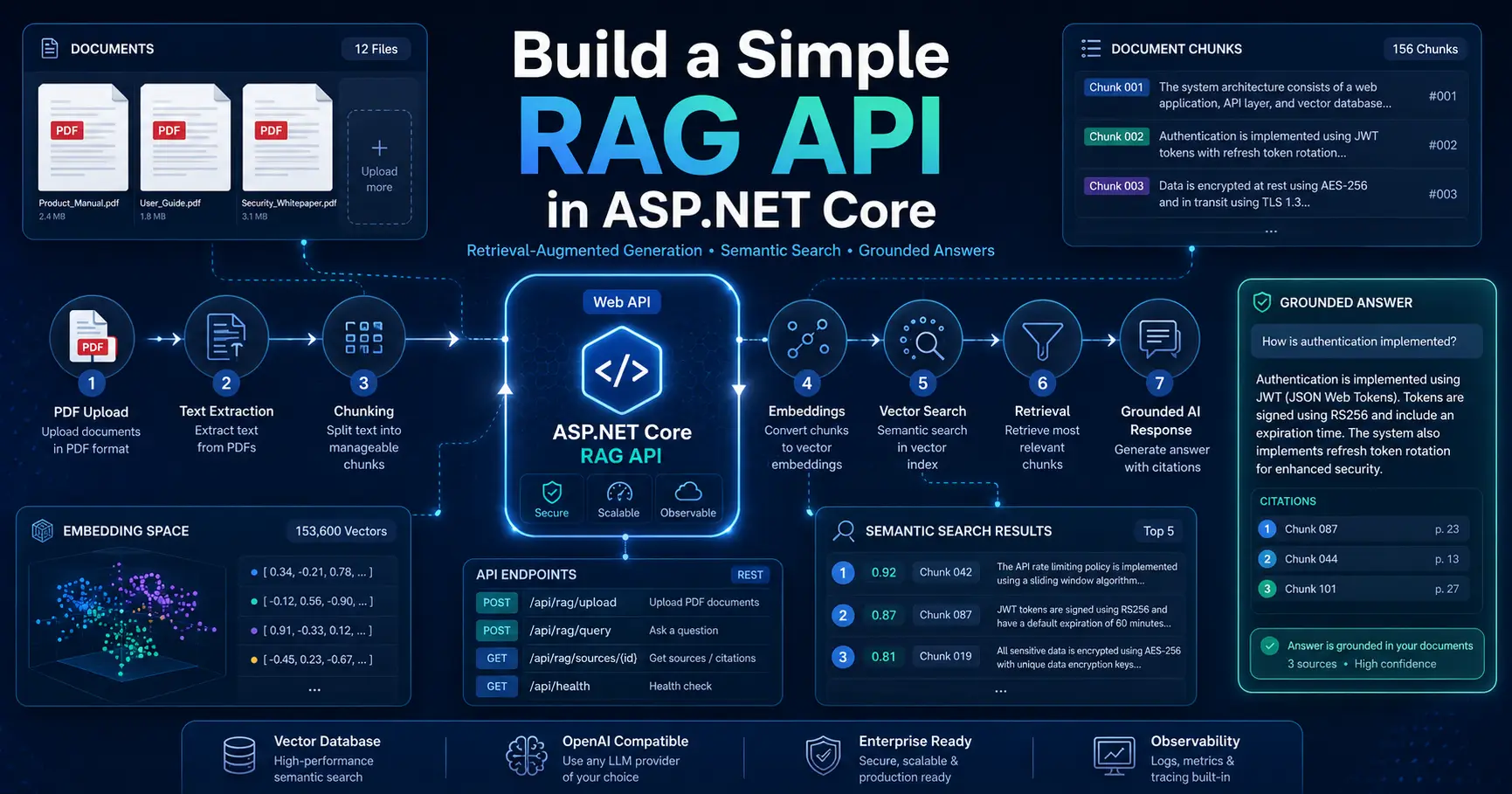
Build a Simple RAG API in ASP.NET Core for internal PDF and document Q&A using chunking, embeddings, retrieval, and grounding.
If you want official platform guidance while implementing this design, these are useful references: .NET AI documentation, Azure AI Search vector search overview, and Azure OpenAI embeddings guidance.
Table of Contents
How to Build a Simple RAG API in ASP.NET Core
When people first hear about Retrieval-Augmented Generation, it can sound like a huge AI platform problem. But in real .NET projects, I usually think about it in a much simpler way. A RAG API is really a search-first answer system. Instead of letting the model answer from memory alone, I retrieve relevant content from my own documents first, then ask the model to answer from that grounded context.
That makes Build a Simple RAG API in ASP.NET Core a very practical topic for internal PDF and document Q&A services. If your business has policy PDFs, SOPs, HR documents, contracts, onboarding guides, internal handbooks, or operations manuals, a simple RAG API can make that content much easier to search and use. The real value here is not that it sounds advanced. The value is that it reduces guesswork and gives users answers that can point back to source material.
Key idea: Build a Simple RAG API in ASP.NET Core by retrieving relevant document chunks first, then generating grounded responses with citations.
Why Build a Simple RAG API in ASP.NET Core for Internal PDF Q&A
This article is useful for .NET developers, backend engineers, technical leads, and architects who want to build a practical internal document Q&A service using ASP.NET Core. It is also useful if you are preparing for AI-related interviews and want a realistic example that combines API design, embeddings, vector retrieval, and grounding.
I especially like this example because it is not just “AI for the sake of AI.” It touches several useful engineering areas at once: HTTP API design, file ingestion, document parsing, vector search, prompt grounding, and response shaping. That makes it a strong learning project and a strong architecture example.
The Architecture I Recommend
When I build the first version, I keep the architecture simple and practical.
Document ingestion flow
- Upload a PDF or document
- Extract text page by page
- Split the content into chunks
- Create embeddings for each chunk
- Store chunk text, metadata, and vectors
Question-answer flow
- Receive the user’s question
- Create an embedding for the question
- Retrieve top matching chunks
- Build a grounded prompt
- Generate an answer using retrieved context
- Return citations with the answer
flowchart LR
    A[PDF Upload] --> B[Text Extraction]
    B --> C[Chunking]
    C --> D[Embeddings]
    D --> E[(Vector Store)]

    U[User Question] --> Q[Question Embedding]
    Q --> R[Top-K Retrieval]
    E --> R
    R --> P[Grounded Prompt]
    P --> LLM[Answer Generation]
    LLM --> X[Answer + Citations]
This is the version I recommend first because it is understandable, testable, and easy to evolve later.
Chunking and Why It Matters
If there is one part of RAG that people underestimate, it is chunking. Poor chunking leads to poor retrieval. Poor retrieval leads to weak answers. So even if the model is good, the overall result can still disappoint if the chunking strategy is poor.
For a first version, I usually start with a simple sliding window approach:
- chunk size around 800 to 1500 characters
- overlap around 100 to 250 characters
- metadata for document id, file name, page number, and chunk id
Later, I improve this with heading-aware, paragraph-aware, or semantic chunking. But for a clean proof of concept, a simple sliding window is often enough.
public interface IChunker
{
    IReadOnlyList<(int PageNumber, string Text)> ChunkPages(
        IReadOnlyList<ExtractedPage> pages,
        int maxChars = 1200,
        int overlap = 200);
}

public sealed class SlidingWindowChunker : IChunker
{
    public IReadOnlyList<(int PageNumber, string Text)> ChunkPages(
        IReadOnlyList<ExtractedPage> pages,
        int maxChars = 1200,
        int overlap = 200)
    {
        var results = new List<(int PageNumber, string Text)>();

        foreach (var page in pages)
        {
            var text = (page.Text ?? string.Empty).Trim();
            if (string.IsNullOrWhiteSpace(text))
                continue;

            int start = 0;

            while (start < text.Length)
            {
                int length = Math.Min(maxChars, text.Length - start);
                string chunk = text.Substring(start, length).Trim();

                if (!string.IsNullOrWhiteSpace(chunk))
                {
                    results.Add((page.PageNumber, chunk));
                }

                if (start + length >= text.Length)
                    break;

                start += maxChars - overlap;
            }
        }

        return results;
    }
}
Embeddings and Retrieval
Embeddings let me search by meaning, not just exact keyword matches. That is important for internal documents because users usually do not ask questions using the exact same wording that appears in the source file.
For example, a user might ask about the remote work approval process, while the source PDF might say that employees must obtain manager authorization before working offsite. A vector-based search can still connect those ideas.
When I build a simple RAG API in ASP.NET Core, I focus first on chunking quality, retrieval quality, and grounded answers instead of overcomplicating the first version.
public interface IVectorStore
{
    Task UpsertAsync(IEnumerable<DocumentChunk> chunks, CancellationToken cancellationToken = default);

    Task<IReadOnlyList<SearchHit>> SearchAsync(
        ReadOnlyMemory<float> queryVector,
        int topK,
        CancellationToken cancellationToken = default);
}
For a simple prototype, I am comfortable using an in-memory vector store so I can focus on the architecture. For production, I would usually move to a real vector-capable backend with better filtering, persistence, and scale.
Grounding and Citations
In my view, grounding is what makes the RAG solution useful and trustworthy. Retrieval alone is not enough. I need to explicitly instruct the model to answer only from the supplied context. If the answer is not in the retrieved chunks, the model should say so instead of inventing something.
- Only retrieved chunks go into the final prompt
- The model should refuse when context is missing
- The response should include citations mapped back to source chunks
The goal of Build a Simple RAG API in ASP.NET Core is not just to generate answers, but to generate answers that are tied back to retrieved internal document sources with citations.
A Practical ASP.NET Core API Design
I like keeping the API surface small in the first version.
Recommended endpoints
- POST /documents/upload-pdf to upload and index a PDF
- POST /ask to submit a question and get a grounded answer with citations
I also prefer separating these responsibilities:
- PDF extraction service
- chunking service
- embedding and vector storage service
- RAG orchestration service
- thin HTTP endpoint layer
This separation keeps the design cleaner and easier to extend later.
Simple Code Examples
Here is a simplified model set I would start with:
public sealed record ExtractedPage(int PageNumber, string Text);

public sealed record DocumentChunk(
    string Id,
    string DocumentId,
    string FileName,
    int PageNumber,
    string Text,
    ReadOnlyMemory<float> Vector);

public sealed record SearchHit(DocumentChunk Chunk, double Score);

public sealed record AskRequest(string Question, int TopK = 5);

public sealed record CitationDto(
    string ChunkId,
    string DocumentId,
    string FileName,
    int PageNumber);

public sealed record AskResponse(
    string Answer,
    IReadOnlyList<CitationDto> Citations);
Here is a simple RAG orchestration service:
using Microsoft.Extensions.AI;

public sealed class RagService
{
    private readonly IChunker _chunker;
    private readonly IVectorStore _vectorStore;
    private readonly IEmbeddingGenerator<string, Embedding<float>> _embeddingGenerator;
    private readonly IChatClient _chatClient;

    public RagService(
        IChunker chunker,
        IVectorStore vectorStore,
        IEmbeddingGenerator<string, Embedding<float>> embeddingGenerator,
        IChatClient chatClient)
    {
        _chunker = chunker;
        _vectorStore = vectorStore;
        _embeddingGenerator = embeddingGenerator;
        _chatClient = chatClient;
    }

    public async Task IngestAsync(
        string documentId,
        string fileName,
        IReadOnlyList<ExtractedPage> pages,
        CancellationToken cancellationToken = default)
    {
        var pieces = _chunker.ChunkPages(pages);
        var chunks = new List<DocumentChunk>();

        int index = 0;
        foreach (var piece in pieces)
        {
            var embedding = await _embeddingGenerator.GenerateAsync(
                new[] { piece.Text },
                cancellationToken: cancellationToken);

            var vector = embedding.First().Vector;

            chunks.Add(new DocumentChunk(
                Id: $"{documentId}-{piece.PageNumber}-{index++}",
                DocumentId: documentId,
                FileName: fileName,
                PageNumber: piece.PageNumber,
                Text: piece.Text,
                Vector: vector));
        }

        await _vectorStore.UpsertAsync(chunks, cancellationToken);
    }

    public async Task<AskResponse> AskAsync(
        AskRequest request,
        CancellationToken cancellationToken = default)
    {
        var queryEmbedding = await _embeddingGenerator.GenerateAsync(
            new[] { request.Question },
            cancellationToken: cancellationToken);

        var hits = await _vectorStore.SearchAsync(
            queryEmbedding.First().Vector,
            request.TopK,
            cancellationToken);

        var context = string.Join(
            "\n\n",
            hits.Select(h => $"""
            [ChunkId:{h.Chunk.Id}]
            [Document:{h.Chunk.FileName}]
            [Page:{h.Chunk.PageNumber}]
            {h.Chunk.Text}
            """));

        var messages = new[]
        {
            new ChatMessage(ChatRole.System, """
                You are an internal document Q&A assistant.
                Answer only from the supplied context.
                If the answer is not present, say:
                "I could not find that in the indexed documents."
                """),
            new ChatMessage(ChatRole.User, $"""
                User question:
                {request.Question}

                Context:
                {context}
                """)
        };

        var response = await _chatClient.GetResponseAsync(messages, cancellationToken: cancellationToken);

        var citations = hits
            .Select(h => new CitationDto(
                h.Chunk.Id,
                h.Chunk.DocumentId,
                h.Chunk.FileName,
                h.Chunk.PageNumber))
            .ToList();

        return new AskResponse(
            response.Text ?? "I could not find that in the indexed documents.",
            citations);
    }
}
And here is a very simple Minimal API setup:
var builder = WebApplication.CreateBuilder(args);

builder.Services.AddEndpointsApiExplorer();
builder.Services.AddSwaggerGen();

builder.Services.AddSingleton<IChunker, SlidingWindowChunker>();
builder.Services.AddSingleton<IVectorStore, InMemoryVectorStore>();
builder.Services.AddSingleton<RagService>();

// Register provider-specific IChatClient and IEmbeddingGenerator here.

var app = builder.Build();

app.UseSwagger();
app.UseSwaggerUI();

app.MapPost("/documents/ingest-text", async (
    IngestTextRequest request,
    RagService rag,
    CancellationToken ct) =>
{
    await rag.IngestAsync(request.DocumentId, request.FileName, request.Pages, ct);
    return Results.Accepted();
});

app.MapPost("/ask", async (
    AskRequest request,
    RagService rag,
    CancellationToken ct) =>
{
    var response = await rag.AskAsync(request, ct);
    return Results.Ok(response);
});

app.Run();

public sealed record IngestTextRequest(
    string DocumentId,
    string FileName,
    IReadOnlyList<ExtractedPage> Pages);
Production Improvements
For a real production system, I would not stop at the simple prototype. I would gradually add:
- semantic or heading-aware chunking
- better parsing for structured PDFs and tables
- hybrid retrieval instead of only vector similarity
- metadata filters by tenant, department, or document type
- background ingestion for larger files
- authentication and authorization for document access
- telemetry, logging, and retrieval diagnostics
- evaluation for groundedness and answer relevance
If I had to summarize Build a Simple RAG API in ASP.NET Core in one sentence, I would call it a search-first answer system for internal documents powered by chunking, embeddings, retrieval, and grounding.
FAQ
Is Azure AI Search required for a RAG API?
No. You can start with a simple in-memory vector store for learning or prototyping. But for production, a real vector-capable backend is usually a better fit.
Why is chunking so important in RAG?
Because retrieval quality depends on how the documents are split. If chunks are too large, too small, or poorly aligned to meaning, retrieval gets weaker and answer quality suffers.
Should I return citations in the response?
Yes. For internal business use cases, citations make the response more explainable and trustworthy because users can trace the answer back to the source chunk.
Can I build this in ASP.NET Core Minimal API?
Yes. Minimal API is a very good fit for a simple RAG service because the HTTP layer can stay thin while ingestion and retrieval logic live in separate services.
What should I improve first after the prototype works?
I would usually improve chunking, storage, filtering, background ingestion, and observability before trying to make the prompt layer more complex.
Conclusion
Build a Simple RAG API in ASP.NET Core is one of the most useful AI architecture exercises for a .NET team because it combines API design, document processing, vector retrieval, grounding, and practical business value.
The key is not to overcomplicate it. Start with document extraction, chunking, embeddings, retrieval, grounded prompting, and citations. That already gives you a very solid internal PDF or document Q&A service.
Once the prototype is working, you can layer in better storage, filtering, security, and observability. That is usually the right path for real-world .NET AI architecture.
Suggested Internal Links
- How to Build AI Apps in .NET Using Microsoft.Extensions.AI
- Azure AI Foundry with .NET: A Practical Beginner-to-Architect Guide
- How to Use Claude API in a .NET Application
- Secure API Design in ASP.NET Core with JWT, OAuth, and Azure Entra ID
Recommended AI Tools & Resources
If you found this article useful, here are some AI tools and resources from AINexArch that can help you work faster and smarter:
- Best AI Writing Tools 2026 — top tools for writing, content, and productivity
- ChatGPT vs Claude 2026 — which AI is better for developers?
- Best Free AI Tools 2026 — powerful AI tools that cost nothing
- Best AI Tools for Content Creators 2026 — complete guide
If you create technical videos, tutorials, or podcast content alongside your development work, ElevenLabs is the best AI voice generator available in 2026. Turn your written content into professional audio in seconds.
👉 Try ElevenLabs Free — Best AI Voice Generator 2026
Disclosure: This article contains affiliate links. If you sign up through my link, I may earn a commission at no extra cost to you.