
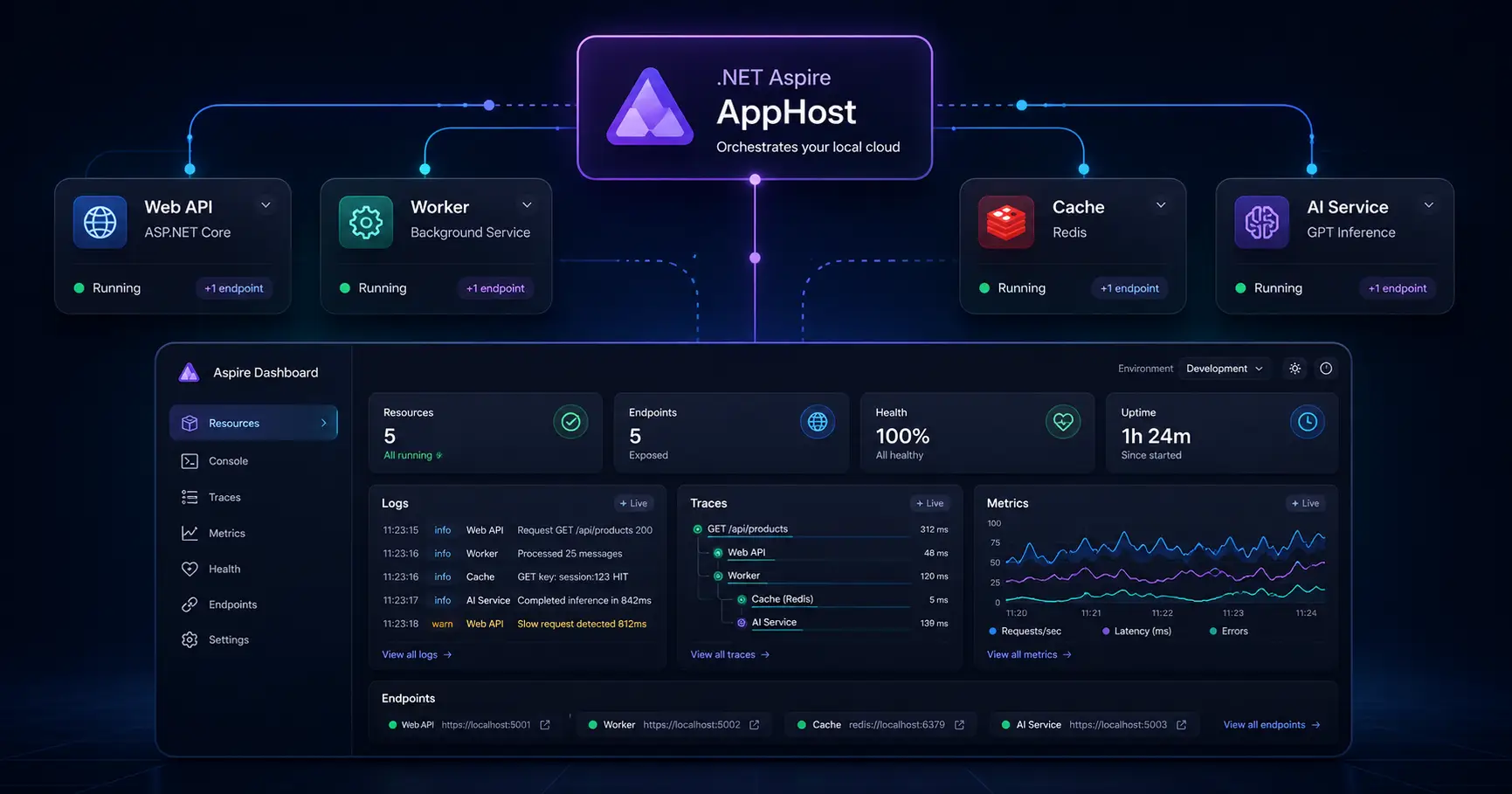
.NET Aspire helps cloud-native teams orchestrate and observe multi-service applications from a single AppHost.
.NET Aspire Explained for Cloud-Native Teams
If you have been hearing more about .NET Aspire and wondering whether it is just another framework buzzword, this post is for you. In this article, I want to give a practical, developer-first explanation of what Aspire does, why it matters, and how it improves the daily workflow for teams building APIs, workers, caches, and AI-enabled services.
What is .NET Aspire?
My simple explanation is this: Aspire gives your team a cleaner way to define, run, and observe a distributed application during local development. Instead of treating each service as an isolated project that needs its own terminal, port, environment variables, secrets, and startup order, Aspire gives you a central orchestration layer through an AppHost.
That AppHost becomes the place where you describe your system in code. You can define your API, worker, cache, and supporting services in one place, then run them together with a single development workflow. For cloud-native teams, that is a big deal because local development often becomes harder long before production deployment does.
If you already read my posts on Microservices Interview Questions for Senior .NET Engineers or Secure API Design in ASP.NET Core with JWT, OAuth, and Azure Entra ID, Aspire fits naturally into that same cloud-native conversation. It is not replacing good architecture. It is improving the day-to-day developer experience around it.
Why Aspire matters for developer productivity
This is the part I care about most. Teams do not adopt tools because the tools sound modern. They adopt them because they remove friction.
Without Aspire, a multi-service setup usually looks like this:
- Start the API in one terminal
- Start the worker in another terminal
- Run Redis or a database in Docker
- Remember which ports are being used
- Manage environment variables manually
- Track logs in multiple places
- Lose time every day repeating the same setup work
Aspire reduces that friction. It helps teams centralize orchestration, dependency wiring, service discovery, health visibility, and local observability. For me, that is the real reason Aspire matters. It turns local distributed development from a fragile routine into a more predictable engineering workflow.
| Without Aspire | With Aspire |
|---|---|
| Multiple terminals and startup steps | Single orchestration entry point |
| Manual local dependency setup | Dependencies modeled in the AppHost |
| Scattered logs and diagnostics | Central dashboard view |
| Hardcoded localhost ports | Cleaner service-to-service references |
| Long onboarding for new developers | More consistent local setup across the team |
A practical example: API + worker + cache + AI service
Let me explain Aspire through a realistic setup. Imagine I am building a small cloud-native solution with:
- An ASP.NET Core API for external requests
- A background worker for async processing
- A Redis cache for short-lived state or fast reads
- An AI service for summarization, classification, or prompt-based features
This is not unusual anymore. In fact, it is becoming common. Even a modest app may quickly evolve into a small distributed system. That is why Aspire is worth learning now, especially if you are also exploring posts like How to Build AI Apps in .NET Using Microsoft.Extensions.AI, Azure AI Foundry with .NET: A Practical Beginner-to-Architect Guide, and Build a Simple RAG API in ASP.NET Core.
In a traditional local setup, developers must start every part manually and hope configuration stays aligned. With Aspire, the application shape is modeled explicitly. That improves clarity, local startup consistency, and troubleshooting.
Simple architecture view
Client/UI
   |
   v
API Service  ---->  Redis Cache
   |
   +----> AI Service
   |
   +----> Background Worker
The biggest productivity win here is not only speed. It is confidence. When the solution starts consistently and the team can see the full system state in one place, debugging becomes less chaotic.
The main building blocks I want teams to understand
1. AppHost
The AppHost is the center of the Aspire solution. It describes your services and their relationships in code. Instead of relying on scattered notes, scripts, and startup conventions, the AppHost becomes the shared system definition for the team.
2. Service Defaults
Service Defaults help standardize common cloud-native concerns like telemetry, health checks, and service-to-service behavior. This is especially useful in real teams because it reduces repetitive plumbing across multiple services.
3. Dashboard
Aspire also improves observability during development. Instead of chasing logs in different windows, developers can inspect resources, endpoints, health, and activity from a central dashboard experience. That may sound small, but it saves real time.
4. Resource modeling
Caches, databases, queues, and supporting services can be modeled as resources. That makes the local setup closer to the actual system shape your team is building.
Sample AppHost setup
Here is a practical example of what an AppHost might look like for an API, worker, Redis cache, and AI service:
var builder = DistributedApplication.CreateBuilder(args);

var cache = builder.AddRedis("cache");

var aiService = builder.AddProject<Projects.AinexArch_AiService>("ai-service");

var api = builder.AddProject<Projects.AinexArch_Api>("api")
    .WithReference(cache)
    .WithReference(aiService)
    .WaitFor(cache)
    .WaitFor(aiService);

var worker = builder.AddProject<Projects.AinexArch_Worker>("worker")
    .WithReference(cache)
    .WithReference(aiService)
    .WaitFor(cache)
    .WaitFor(aiService);

builder.Build().Run();
What I like about this approach is how readable the orchestration intent becomes. Even without opening every project, I can see how the system is composed and which services depend on which resources.
Service Defaults example
In the API project, I would usually keep shared cloud-native wiring consistent through Service Defaults:
var builder = WebApplication.CreateBuilder(args);

builder.AddServiceDefaults();

builder.Services.AddEndpointsApiExplorer();

var app = builder.Build();

app.MapDefaultEndpoints();
app.MapGet("/healthz", () => Results.Ok("Healthy"));

app.Run();
A worker service can follow a similar pattern:
var builder = Host.CreateApplicationBuilder(args);

builder.AddServiceDefaults();
builder.Services.AddHostedService<JobProcessor>();

var host = builder.Build();
host.Run();
This is one reason I see Aspire as a productivity tool, not just an infrastructure experiment. It encourages a more consistent way to wire distributed service concerns without every developer inventing their own local pattern.
Why Aspire is especially useful for AI-enabled systems
AI features rarely stay isolated for long. What starts as a small prompt call quickly grows into a system with caching, background processing, telemetry, retries, secrets, and multiple supporting services. That is exactly where Aspire becomes valuable.
If you are building internal AI-enabled platforms, support copilots, document summarization services, or small RAG-style APIs, Aspire helps keep the local environment manageable while the architecture grows.
When I would use Aspire
I would seriously consider Aspire when:
- You have multiple services in the same solution
- Developers keep struggling with local setup
- You are using caches, queues, or databases locally
- You want a better inner-loop experience for distributed systems
- You want cleaner onboarding for new team members
- Your app is growing toward cloud-native or AI-enabled architecture
I would probably skip Aspire for a tiny single-project application with no real distributed concerns. In that case, the added structure may not pay off yet. But once the app becomes a real multi-service system, Aspire starts making much more sense.
What Aspire is not
Aspire is not a replacement for ASP.NET Core. It is not a replacement for your production cloud platform. And it is not magic. You still need good architecture, clean APIs, secure identity, proper observability, and disciplined deployment practices.
What Aspire does is improve the local composition and development experience around those systems. That is why I think cloud-native teams should pay attention to it.
Final thoughts
If I had to explain .NET Aspire explained in one sentence, I would say this:
Aspire helps cloud-native teams treat local distributed development like a real system instead of a collection of disconnected startup steps.
That is why it matters for developer productivity. It reduces local chaos, improves consistency, and gives teams a clearer way to build and debug distributed applications. For modern .NET teams working with APIs, workers, caches, and AI services, that is a practical advantage worth understanding.
FAQ
What is .NET Aspire used for?
.NET Aspire is used to improve local development and orchestration for distributed applications. It helps teams manage services, dependencies, and observability in a more structured way.
Is .NET Aspire only for microservices?
No. It is most valuable when you have multiple moving parts, but those do not have to be traditional microservices. Even an API, worker, cache, and AI service setup can benefit from Aspire.
Does Aspire replace Kubernetes or Azure?
No. Aspire is mainly about the developer experience and application composition layer. It does not replace your production hosting platform.
Why does Aspire help developer productivity?
It reduces manual setup, centralizes orchestration, makes local dependencies easier to manage, and gives developers better visibility into the whole application during development.
Should every .NET project use Aspire?
No. For small single-project apps, Aspire may be unnecessary. Its value becomes clearer as soon as your solution includes multiple services or supporting resources.
Recommended AI Tools & Resources
If you found this article useful, here are some AI tools and resources from AINexArch that can help you work faster and smarter:
- Best AI Writing Tools 2026 — top tools for writing, content, and productivity
- ChatGPT vs Claude 2026 — which AI is better for developers?
- Best Free AI Tools 2026 — powerful AI tools that cost nothing
- Best AI Tools for Content Creators 2026 — complete guide
If you create technical videos, tutorials, or podcast content alongside your development work, ElevenLabs is the best AI voice generator available in 2026. Turn your written content into professional audio in seconds.
👉 Try ElevenLabs Free — Best AI Voice Generator 2026
Disclosure: This article contains affiliate links. If you sign up through my link, I may earn a commission at no extra cost to you.