
ML.NET vs Azure AI Services is one of the most important architecture decisions for .NET teams in 2026.
Many .NET teams ask me whether they should choose ML.NET vs Azure AI Services for their next AI feature. My practical answer is that these are not identical tools solving the same problem. ML.NET is strongest for structured prediction running inside your application, while Azure AI Services are stronger for hosted language, document, speech, search, and LLM-driven workloads. The right choice depends on whether you need offline inference, bounded predictions, managed cloud AI capability, enterprise governance, or a hybrid architecture.
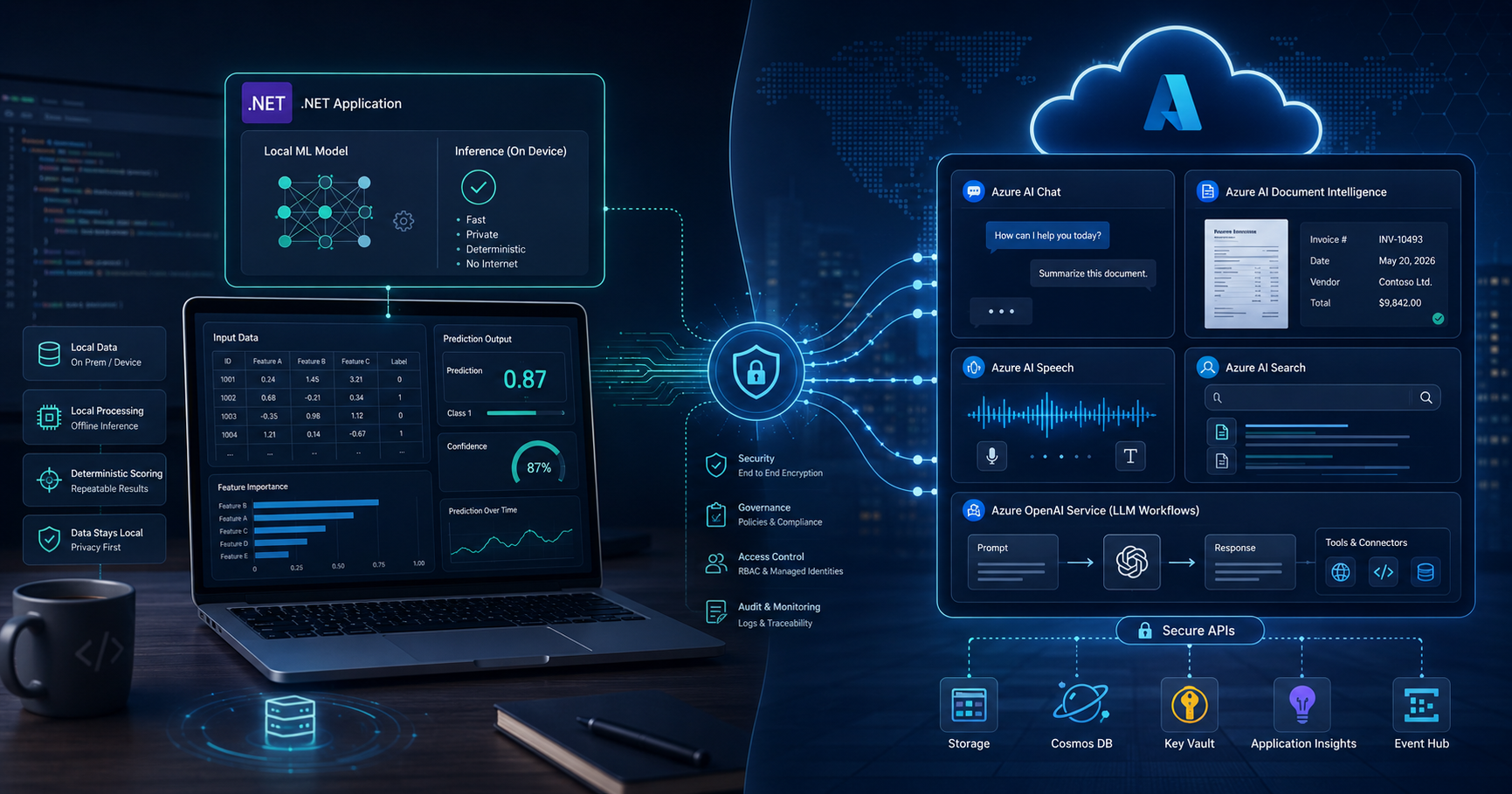
ML.NET vs Azure AI Services: What Should .NET Teams Choose in 2026?
Version Info
This article is written for modern .NET teams in 2026, with examples aligned to .NET 10, ASP.NET Core 10, current ML.NET usage, and current Azure AI development patterns.
Who Should Read This
- .NET developers comparing local ML and hosted AI options
- Architects deciding between structured prediction and cloud AI services
- Teams planning offline AI, document AI, search, or LLM features
- Senior engineers designing governed enterprise AI solutions on Azure
Key Takeaways
- ML.NET is best for structured prediction problems such as classification, regression, anomaly detection, forecasting, and recommendation.
- Azure AI Services are best for language, document intelligence, speech, search, and generative AI workloads.
- If your app must work offline or keep inference inside the application boundary, ML.NET has a clear advantage.
- If your app needs chat, summarization, OCR, RAG, or cloud-scale AI APIs, Azure AI Services are usually the better fit.
- For many real systems, the strongest design is a hybrid architecture that uses both.
Table of Contents
- Why teams compare these two
- What ML.NET is best at
- What Azure AI Services are best at
- ML.NET vs Azure AI Services: quick decision matrix
- Local prediction model vs hosted AI service
- Cost and governance
- My recommended hybrid architecture
- Final verdict
- FAQ
Why .NET Teams Compare ML.NET vs Azure AI Services
I understand why this comparison happens so often. Both options sit in the Microsoft ecosystem. Both can be used from C# and ASP.NET Core. Both are described as “AI” in planning discussions. But the shape of the problem matters more than the product family.
If your workload is something like ticket classification, churn prediction, anomaly detection, recommendation, demand forecasting, or fraud-style scoring, that is usually a structured machine learning problem. If your workload is something like document extraction, summarization, chat, speech transcription, OCR, enterprise search, or retrieval-augmented generation, that is usually a hosted AI service problem.
That is why I do not treat ML.NET vs Azure AI Services as a simple winner-loser comparison. I treat it as a question of where intelligence should live and what kind of intelligence the application actually needs.
In real projects, ML.NET vs Azure AI Services is not about which platform is better overall, but which one fits the workload more naturally.
What ML.NET Is Best At
ML.NET is the better choice when your application needs a bounded prediction based on structured or labeled data. This usually means the output is a known value such as a class label, a score, a numeric estimate, or an anomaly flag.
Typical ML.NET-friendly use cases include:
- Support ticket category prediction
- Lead scoring or churn prediction
- Demand forecasting
- Recommendation systems
- Anomaly detection on transactions or operations data
- Local image or ONNX-based inference embedded in a .NET application
What I like about ML.NET is that it keeps prediction close to the application itself. That matters when the team wants local inference, controlled deployment, offline behavior, and deterministic business-friendly scoring.
Example: local ticket classification with ML.NET
If your application needs to classify support requests into categories such as Billing, Access, or Technical, ML.NET is a natural fit. You are solving a classic multiclass classification problem, not asking a hosted model to reason across open-ended language.
using Microsoft.ML;
using Microsoft.ML.Data;

public class TicketInput
{
    public string Description { get; set; } = "";
    public string Category { get; set; } = "";
}

public class TicketPrediction
{
    [ColumnName("PredictedLabel")]
    public string PredictedCategory { get; set; } = "";
}

var trainingData = new List<TicketInput>
{
    new() { Description = "Invoice failed and refund is pending", Category = "Billing" },
    new() { Description = "User is locked out after MFA reset", Category = "Access" },
    new() { Description = "API throws 500 on save", Category = "Technical" },
    new() { Description = "Duplicate charge on last payment", Category = "Billing" },
    new() { Description = "Cannot sign in to dashboard", Category = "Access" },
    new() { Description = "File upload crashes the app", Category = "Technical" }
};

var ml = new MLContext(seed: 1);
IDataView data = ml.Data.LoadFromEnumerable(trainingData);

var pipeline =
    ml.Transforms.Text.FeaturizeText("Features", nameof(TicketInput.Description))
      .Append(ml.Transforms.Conversion.MapValueToKey("Label", nameof(TicketInput.Category)))
      .Append(ml.MulticlassClassification.Trainers.SdcaMaximumEntropy("Label", "Features"))
      .Append(ml.Transforms.Conversion.MapKeyToValue("PredictedLabel"));

var model = pipeline.Fit(data);
var engine = ml.Model.CreatePredictionEngine<TicketInput, TicketPrediction>(model);

var prediction = engine.Predict(new TicketInput
{
    Description = "Customer cannot log in after password reset"
});

Console.WriteLine($"Predicted category: {prediction.PredictedCategory}");
In this kind of scenario, a local ML.NET model is often cleaner, cheaper, and easier to explain than a prompt-based approach.
What Azure AI Services Are Best At
Azure AI Services are stronger when the input is unstructured and the application needs hosted capabilities such as:
- Summarization and chat
- Retrieval-augmented generation over enterprise documents
- OCR and form extraction
- Speech-to-text or text-to-speech
- Language understanding and extraction
- Search-backed grounded answers
In practical .NET architecture terms, Azure AI Services are the better fit when the team wants to consume secure cloud AI APIs rather than own the full lifecycle of training, packaging, and shipping a custom prediction model.
Example: hosted incident summarization with Azure OpenAI
If the business wants a service that summarizes incident reports, extracts customer impact, and drafts next actions, that is not a classic structured prediction task. That is where a hosted service such as Azure OpenAI becomes the better option.
using Azure.AI.OpenAI;
using Azure.Identity;
using OpenAI.Chat;

var azureClient = new AzureOpenAIClient(
    new Uri("https://your-azure-openai-resource.openai.azure.com/"),
    new DefaultAzureCredential());

ChatClient chatClient = azureClient.GetChatClient("my-gpt-4o-mini-deployment");

ChatCompletion completion = chatClient.CompleteChat(
[
    new SystemChatMessage("You are a concise enterprise incident assistant."),
    new UserChatMessage("""
        Summarize this outage report in 5 bullet points.
        Then list customer impact and next actions.

        Incident details:
        - API latency started at 8:05 AM
        - Root cause was database connection pool exhaustion
        - Login failures peaked at 12%
        - Mitigation included scaling app instances and restarting worker pool
        - Full recovery occurred at 8:42 AM
    """)
]);

Console.WriteLine(completion.Content[0].Text);
Once the workload becomes conversational, document-heavy, or search-grounded, Azure AI Services usually pull ahead quickly.
For structured scoring, forecasting, and classification, the ML.NET vs Azure AI Services choice usually favors ML.NET, while document AI, speech, search, and LLM scenarios usually favor Azure AI Services.
When comparing ML.NET vs Azure AI Services, I recommend reviewing the official ML.NET overview, the Azure AI Services overview, and the Azure AI Search RAG overview to understand how local prediction, hosted AI services, and grounded enterprise retrieval differ in real .NET architectures.
ML.NET vs Azure AI Services: Quick Decision Matrix
| Question | Choose ML.NET | Choose Azure AI Services |
|---|---|---|
| Is the input mostly structured? | Yes | Not usually |
| Do you need offline or local inference? | Strong fit | Usually not the default fit |
| Do you need OCR, chat, RAG, speech, or summarization? | Weak fit | Strong fit |
| Do you want cloud-managed AI capability? | No | Yes |
| Is the output a known score, label, or forecast? | Excellent fit | Possible but often unnecessary |
| Do you want grounded answers over enterprise content? | No | Excellent fit with Azure AI Search |
Local Prediction Model vs Hosted AI Service
This is the most practical way to think about ML.NET vs Azure AI Services.
A local prediction model is ideal when you want the application to make a bounded decision internally, with little or no dependency on external runtime calls. That usually means better fit for repetitive structured predictions, especially when internet access is limited or controlled.
A hosted AI service is ideal when the application needs advanced capabilities that would be expensive or awkward to rebuild yourself, such as OCR, chat completion, speech processing, semantic retrieval, or document extraction.
My shortcut is simple:
- If the business says, “We need a prediction,” I think about ML.NET first.
- If the business says, “We need understanding, generation, extraction, or conversation,” I think about Azure AI Services first.
Cost and Governance
Cost is not just about sticker price. It is about the operating model.
With ML.NET, the cost usually shifts into your own compute, training process, validation, retraining, packaging, and release management. For high-volume structured predictions, that can be efficient and predictable.
With Azure AI Services, the cost usually shifts into managed service consumption. That can be a very good trade-off when the alternative would be spending engineering time to build and maintain capabilities such as document processing, search grounding, speech pipelines, or hosted LLM workflows.
Governance is another major reason enterprises lean toward Azure AI Services. Azure-native identity, RBAC, managed identity, networking, and policy controls matter when the workload needs to fit inside a broader enterprise platform strategy.
That said, ML.NET still has a governance advantage when the requirement is simply to keep inference inside the application boundary. In that case, the model is local, but the team also owns more of the lifecycle.
My Recommended Hybrid Architecture for Real .NET Teams
In many projects, the best answer is not one or the other.
A strong real-world design might look like this:
- ML.NET predicts churn risk or ticket category from structured data
- Azure AI Search retrieves grounded enterprise content
- Azure OpenAI generates a summary, recommendation, or agent-facing next step
- Document Intelligence extracts fields from uploaded forms or PDFs
This hybrid style keeps each technology in the place where it adds the most value.
If you are building broader AI application architecture in .NET, read How to Build AI Apps in .NET Using Microsoft.Extensions.AI. If your workload shape also affects where APIs and workers should run, my comparison of App Service vs Azure Functions vs Container Apps is a useful next step.
And if you care about operational reality after deployment, pair this with Production Support in .NET and Azure and Microservices Interview Questions for Senior .NET Engineers.
Final Verdict
My honest answer on ML.NET vs Azure AI Services is this:
ML.NET is for machine learning inside your .NET app. Azure AI Services are for managed AI capabilities around your app.
So if your team is building churn scoring, recommendation, anomaly detection, or structured classification, start with ML.NET. If your team is building chat, summarization, OCR, RAG, document AI, or speech-driven features, start with Azure AI Services. And if your system has both structured and unstructured intelligence, design a hybrid architecture instead of forcing one tool to do everything.
My final view on ML.NET vs Azure AI Services is simple: use ML.NET for local prediction inside your application, and use Azure AI Services for managed cloud AI capabilities.
FAQ
Is ML.NET good for LLM applications?
Not as the main engine. ML.NET is much stronger for structured prediction than for open-ended generative AI, chat, or summarization scenarios.
Is ML.NET useful for offline scenarios?
Yes. That is one of its biggest practical advantages for .NET teams that want inference to run inside the application or in controlled environments.
Which option is better for OCR and PDF extraction?
Azure AI Services, especially Document Intelligence, are the better fit for OCR, tables, fields, forms, and document extraction workflows.
Which option is better for enterprise search and RAG?
Azure AI Search combined with Azure OpenAI is the stronger fit for grounded enterprise retrieval and modern RAG patterns.
Which one is better for ticket classification or churn prediction?
If the data is structured and the output is a known label or score, ML.NET is usually the more natural engineering choice.
Can .NET teams use both ML.NET and Azure AI Services in one system?
Yes. In fact, many serious enterprise systems benefit from exactly that combination: ML.NET for local or structured prediction, and Azure AI Services for hosted language, document, search, and generative workflows.
Final Thoughts
The smartest .NET teams in 2026 will not choose based on hype. They will choose based on the shape of the problem.
Use ML.NET when prediction is structured, bounded, and close to the application. Use Azure AI Services when intelligence needs to be cloud-hosted, language-aware, document-centric, search-grounded, or generative. That is the practical decision model I would use in a real architecture review.
Continue Reading on AINexArch
- How to Build AI Apps in .NET Using Microsoft.Extensions.AI
- App Service vs Azure Functions vs Container Apps for .NET
- Production Support in .NET and Azure
- Microservices Interview Questions for Senior .NET Engineers
- Join the AINexArch Newsletter
Recommended AI Tools & Resources
If you found this article useful, here are some AI tools and resources from AINexArch that can help you work faster and smarter:
- Best AI Writing Tools 2026 — top tools for writing, content, and productivity
- ChatGPT vs Claude 2026 — which AI is better for developers?
- Best Free AI Tools 2026 — powerful AI tools that cost nothing
- Best AI Tools for Content Creators 2026 — complete guide
If you create technical videos, tutorials, or podcast content alongside your development work, ElevenLabs is the best AI voice generator available in 2026. Turn your written content into professional audio in seconds.
👉 Try ElevenLabs Free — Best AI Voice Generator 2026
Disclosure: This article contains affiliate links. If you sign up through my link, I may earn a commission at no extra cost to you.